


Introducing more flexibility and efficiency to lift up your business operations and customer service — and bottom line
We just launched two groundbreaking features designed to enhance your estimating experience and provide your customers with unparalleled flexibility and choice: Dynamic Estimates and Estimate Packages. Both are designed to enhance the customer experience but cater to different needs and preferences. Read more about them here about intercom.help: 9214618 dynamic estimates and estimate packages.
Dynamic Estimates offer a personalized approach, allowing customers to tweak services to their exact specifications, which is perfect for those who know exactly what they want and perhaps wish to engage more deeply with the service details.
On the other hand, Estimate Packages simplify the decision-making process by offering pre-defined bundles that are easy to choose from, ideal for customers looking for convenience and quick decisions.These features are now available exclusively on the V3 desktop for our Growth Plan users.
Drive more revenue growth through tailored and customizable Dynamic Estimates
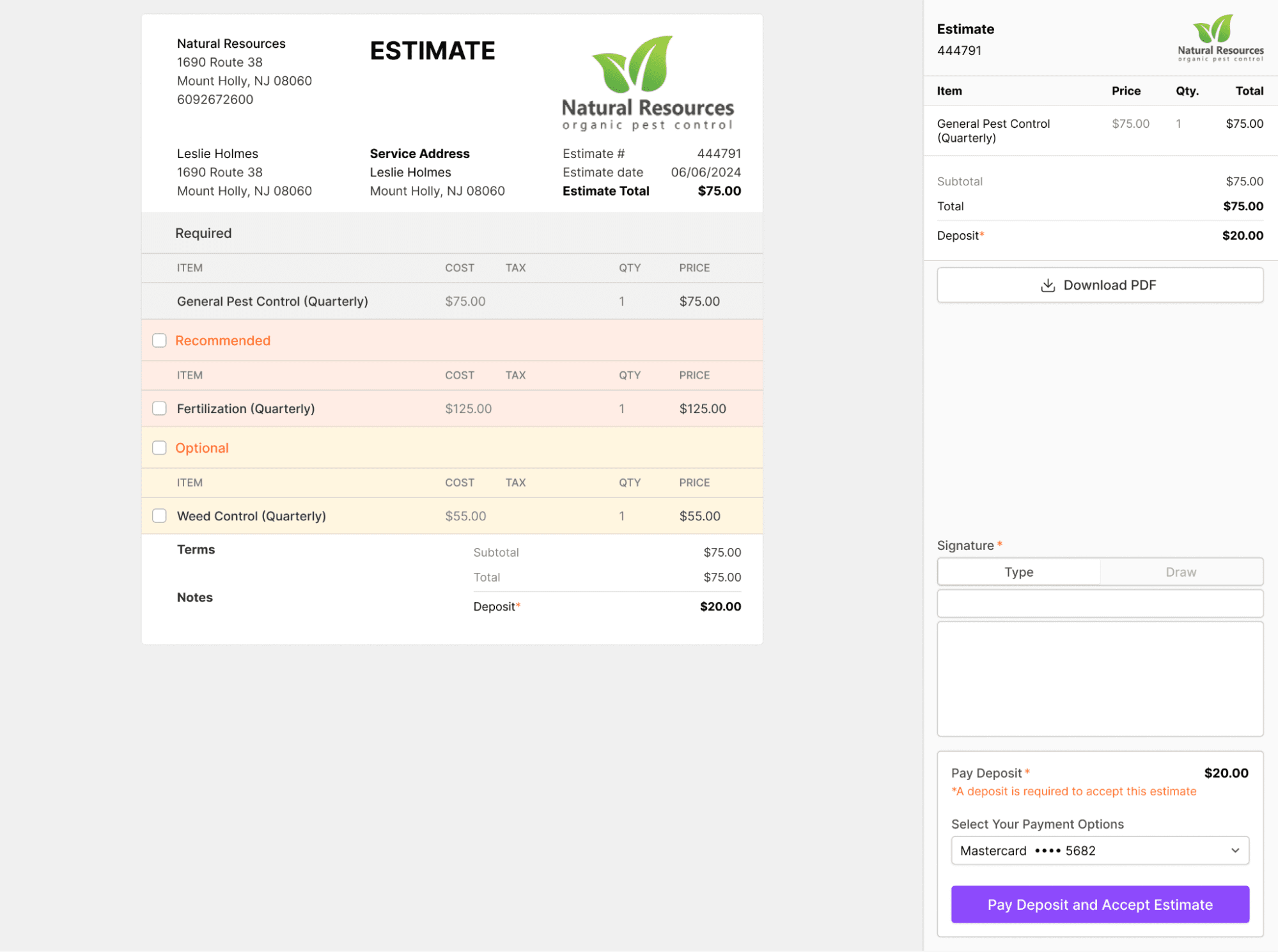
Dynamic Estimates can revolutionize the way you create estimates by allowing you to include optional and recommended items. Now you can offer a more tailored experience, giving your customers the power to customize services according to their specific needs.
Items in the estimate can be tagged as Required, Recommended, or Optional, ensuring that customers have clarity on what is essential and what can be adjusted according to their preferences.
Your business will enjoy:
- Increased conversion rates: By providing customizable options, you’re more likely to meet the diverse needs of your customers, leading to higher acceptance rates.
- Happier customers: Giving customers control over their service choices increases satisfaction and loyalty.
Your customers will enjoy:
- A more personalized experience: Customers enjoy the flexibility to modify their service packages to better fit their requirements and budget.
- Clarity and transparency: Clear categorization of services as Required, Recommended, or Optional helps customers make informed decisions.
Make saying “yes” easier for your customers with Estimate Packages
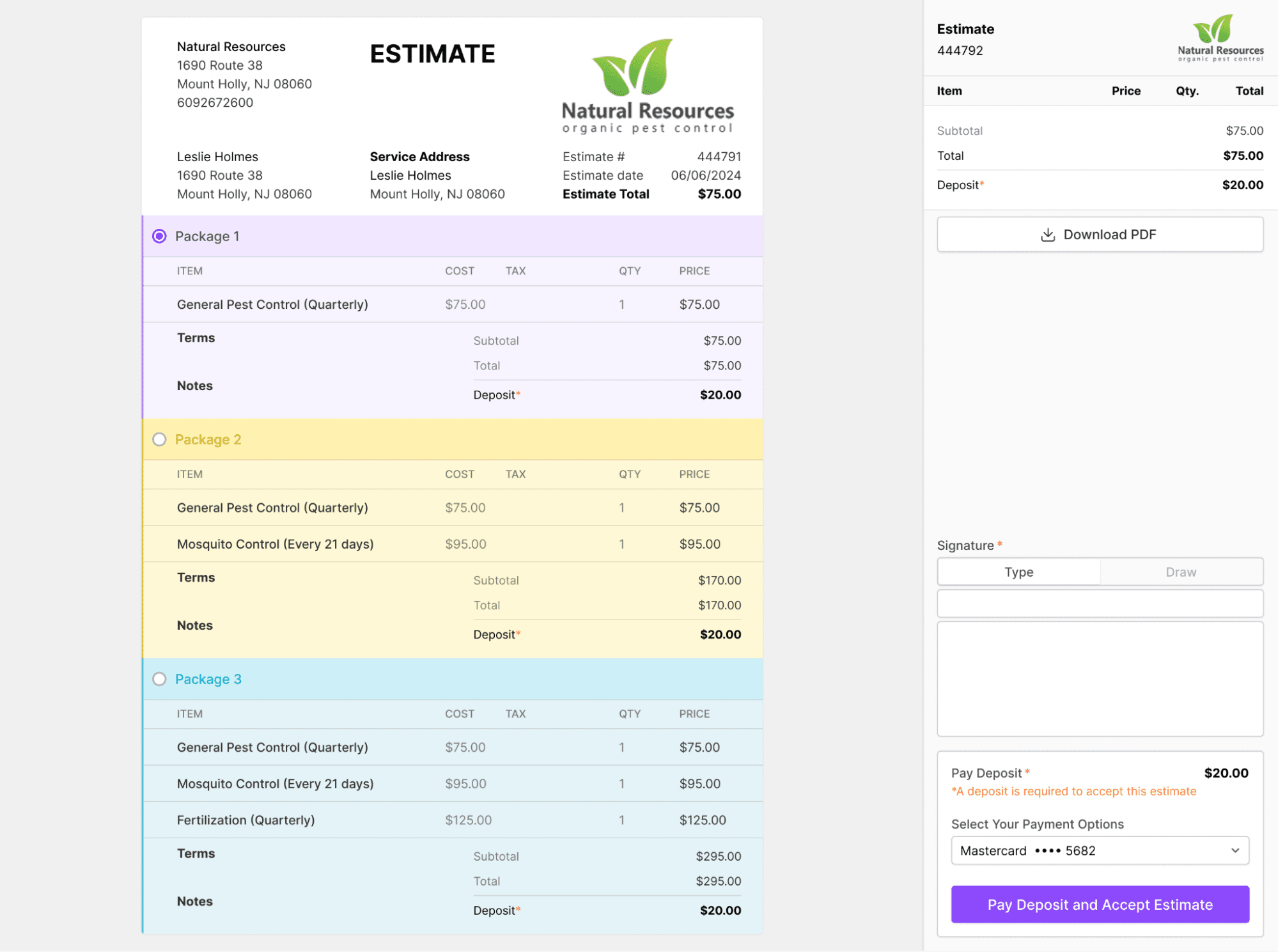
With Estimate Packages, you can bundle services into comprehensive packages, making it easier for customers to choose a deal that best fits their needs and budget. Removing the burden of extensive research and decision-making, and eliminating the complexity of choice empowers your customers to make quicker decisions — and can set the tone for an easy ride and ultimate customer satisfaction.This feature allows you to create multiple package options within a single estimate, each with its own set of included services. You can even assign colors to different packages for clearer differentiation and a visually appealing presentation. The predefined packages:
- Simplify the decision-making process for your clients, reducing your business’ time between estimate and approval
- Can lead to more efficient job scheduling and resource allocation
Your customers will appreciate:
- The ability to select the one that offers the best value for their needs; with pre-packaged options, customers can easily compare different packages
- Cost-effective choices that provide more value for cost, appealing to budget-conscious clients
How to get started
Simply enable the Estimates addon on your desktop. Here’s how:
- Navigate to Addons and toggle on Dynamic Estimates
- Enable both Dynamic and Package types to make them available for new estimates
Creating your new estimate, step by step
When you’re ready to create a new estimate, just follow these steps:
- Click the ‘+’ icon on the calendar header and select “New Estimate”
- Choose the type of estimate you want to create from the Type dropdown menu:
- Basic Type: A standard estimate where the entire offer can be accepted or declined
- Dynamic Type: Customize the estimate with Required, Recommended, or Optional items
- Packages: Offer various package options, each consisting of multiple items
What your customers will see
When requesting an e-signature, your customers will see a clear and concise layout of the estimate. In Dynamic-type estimates, they can select from recommended and optional items before signing. In Package-type estimates, they can choose the package that best meets their needs.
Provide a comprehensive solution that caters to both ends of the customer spectrum …
… from those desiring deep customization to those who prefer the ease of pre-packaged choices.
This dual approach not only increases customer satisfaction across different demographics but also enhances the efficiency of business operations, leading to higher conversion rates and better resource allocation.
Our introduction of Dynamic Estimates and Estimate Packages marks a significant leap towards more customized and streamlined service offerings in the business operations sphere. These tools not only empower customers with choices that align perfectly with their needs and budgets but also help businesses in managing resources more effectively and closing deals faster. With these innovations, GorillaDesk is set to redefine how services are estimated, offered, and delivered, ensuring that both businesses and their clients come out ahead. Embrace the future of service customization and efficiency with GorillaDesk’s latest offerings.
Getting Started is Simple:
- Go to ‘Addons’ and enable Dynamic Estimates.
- Set up both Dynamic and Package types for new estimates.
- Create a new estimate by clicking the ‘+’ icon and selecting your preferred type.